
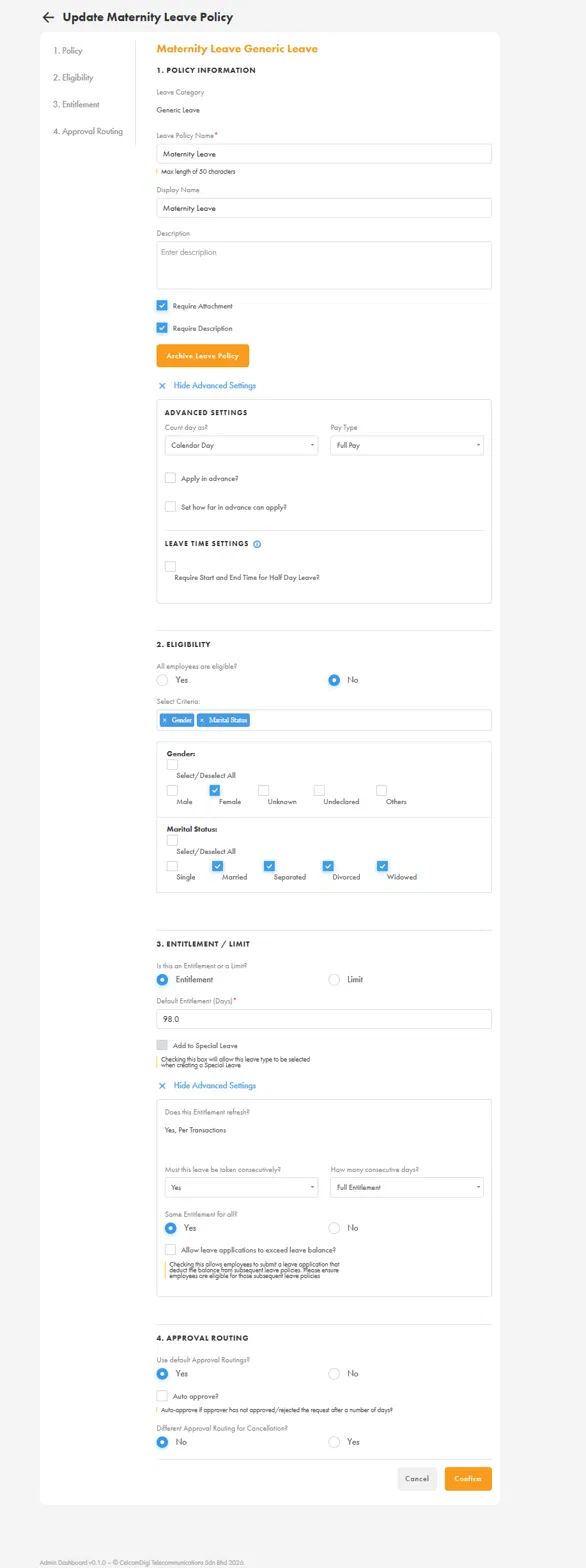
This guide shows you how to set up a Maternity Leave policy under the Generic Leave category in altHR, including eligibility criteria, entitlement rules, and approval routing.
Prerequisites
- You must have Company Admin access.
- The Leaves Module must already be enabled under Company > Modules.
- Confirm your company's maternity leave entitlement (days) and any internal policy conditions before you start.
Steps
1. Go to Policy setup
Navigate to Leaves > Policies > Add Policy and select Generic Leave as the Leave Category.
2. Fill in Policy Information
- Leave Policy Name: e.g.
Maternity Leave(max 50 characters) - Display Name: how the policy appears to employees, e.g.
Maternity Leave - Description: optional, but recommended if you've enabled Require Description below
- Require Attachment: tick if employees must upload supporting documents (e.g. medical certificate)
- Require Description: tick if employees must provide a reason/description when applying
Advanced Settings:
- Count day as:
Calendar Day(maternity leave is typically counted as calendar days, not working days only) - Pay Type:
Full Pay - Apply in advance? leave unticked unless your company requires advance notice
- Require Start and End Time for Half Day Leave? not applicable — maternity leave is not typically taken in half days
3. Set Eligibility
Under 2. Eligibility, select No for "All employees are eligible?" and add the following criteria:
- Gender:
Femaleonly - Marital Status: select which marital statuses qualify (e.g. Married, Separated, Divorced, Widowed)
⚠️ Compliance note: Malaysia's Employment Act (post-2022 amendment) does not condition maternity leave eligibility on marital status — unmarried employees are also entitled to statutory maternity leave. Before excluding any marital status group (e.g. Single), confirm this is intentional and consistent with the company's actual policy and current labour law.
4. Set Entitlement / Limit
Under 3. Entitlement / Limit:
- Is this an Entitlement or a Limit?
Entitlement - Default Entitlement (Days):
98.0(Malaysia's statutory maternity leave entitlement) - Does this Entitlement refresh?
Yes, Per Transaction— entitlement is granted fresh each time the employee applies, rather than on a fixed annual cycle. This reflects the nature of maternity leave, which is tied to individual pregnancy events rather than a calendar cycle. - Must this leave be taken consecutively?
Yes - How many consecutive days?
Full Entitlement - Same Entitlement for all?
Yes - Allow leave applications to exceed leave balance? leave unticked unless there's a specific business reason to allow it
5. Set Approval Routing
Under 4. Approval Routing:
- Use default Approval Routings?
Yes(recommended, unless this policy needs a dedicated routing, e.g. routing to HR instead of Line Manager for sensitive leave types) - Auto approve? leave unticked
- Different Approval Routing for Cancellation?
No, unless the company wants cancellations reviewed separately
6. Confirm
Click Confirm to save the policy.
Verify It Worked
- Open a test/demo employee profile that matches the eligibility criteria (Female + qualifying marital status) and confirm the Maternity Leave policy appears as available to apply.
- Open a profile that should be excluded (e.g. Male, or an excluded marital status) and confirm the policy does not appear — this also verifies the checkbox logic hasn't inverted.
- Check that the entitlement shows as 98.0 days and that it doesn't reduce/reset unexpectedly on a fixed cycle date (since it's set to refresh per transaction).
Common Issues
- Employee can't find the Maternity Leave policy to apply: Check the policy is toggled on, and re-check the eligibility criteria against the employee's Gender and Marital Status fields in their profile — a mismatch (or the marital status inversion bug) is the most common cause.
- Entitlement doesn't behave as expected across multiple pregnancies: Since the entitlement refreshes per transaction rather than per cycle, each qualifying application should generate its own 98-day allocation. If this isn't happening, escalate to L3 for investigation.
- Eligibility criteria excludes unmarried employees: Revisit with the client — this may not align with current statutory requirements. See the Compliance note above.